FORMIDABLE TASK
Started: 08-06-2025
Completed: 10-29-2025
FORMIDABLE TASK is a Game Boy game that I made with GB Studio where you slowly but surely chip away at the task of clearing out rocks from a cave. It's repetitive and boring, but as long as you keep working at it bit by bit, you will get there.
You can play it in browser, or download the Game Boy ROM here.
This is a game inspired by the feelings that I had while creating Medical Malpicross, which might make sense. I wanted to channel my own feelings about slowly working at this thing day after day with seemingly no end in sight into a game.
The Game Boy is a really fun platform to target when you have something like GB Studio to make it super simple. It's designed to create specific types of games, and if your idea falls into one of those types, then it's pretty easy to get a guy moving around on the screen and doing the basic actions that you want. The drag and drop coding interface is extensive enough to allow you to be able to create custom stuff as well.
GB Studio seems to be a pretty good tool for beginners and people who don't know how to program. Its official documentation might be lacking a bit at times, but there are a lot of community resources that exist to help people get started.
One thing I appreciate about GB Studio is how it makes saving and loading really simple. It handles the saving and restoring of memory all for you so you don't have to mess around with it and can just call "Save Data" and "Load Data" functions at the right points and it's easy.
Hardware Limitations
Obviously, being playable on a Game Boy (or Game Boy Color) means following certain restrictions. Things like restrictive screen size, color palette, and sound hardware limitations are fun to work with. I like pixel art, but I am also bad at colors and color palettes, so having a thing force me to make color decisions implicitly means that I don't get hung up on it when creating things.
GB Studio is essentially an engine built on top of Game Boy hardware (it's a whole stack of stuff), so it also has its own particular ways of doing things which may come with their own limitations. For example, as far as I know, you can't dynamically create and destroy actors at runtime. This means that for each "scene" in your game, the actors that are in it will only be the ones that you put in there from the moment that you decided to build and run the game (you can shoot projectiles, but those are kind of their own special thing). This does have its benefits: memory management is much simpler because all actors are known about from the start, and the average person doesn't have to worry about accidentally creating situations where they run out of memory. Scenes themselves are largely self contained, so the actors in each scene can't really directly "know" about other actors in other scenes. They can indirectly interact with other scenes and actors through global variables, though. These things limit what you can do, which is just another thing to work around. GB Studio allows for lower level access to its underlying core, which may make certain things possible, but I didn't really want to dip into that, so all of the stuff I used was the more accessible tools.
The original idea for the game involved picking up rocks inside a house and then slowly carrying them outside into a dumping zone somewhere. I thought that the constant running back and forth would be perfectly tedious for the type of game that I was trying to create. As you progress deeper and deeper into the house, you get farther from the dumping zone, so each individual rock takes longer to remove. This is nigh impossible to do within GB Studio (without possible shenanigans, at least) and it was the first challenge that I hit. Without being able to dynamically create actors, there was no way that I was going to be able to allow the player to pick up a rock and place it anywhere else in other scenes. I could create invisible rocks in a scene that appear when the player brings a new rock, but per-scene actor limits makes that fail pretty quickly upon trying to bring multiple rocks into a new scene.
Additionally, normal Game Boy hardware limitations mean that only 10 sprites can be drawn on the screen at all times, and only 5 sprites can occupy the same horizontal slices of the screen at a time and any more will result in sprites being cut off or invisible. In GB Studio, there is a hard limit of 20 actors, though the "10 sprites drawn at a time" thing realistically means you will have less than 20 actors in a screen. This means that you can't have too many things grouped up together which sucks because I wanted to have a bunch of rocks on one screen.
I also wanted the player to be able to move around freely and not restricted to a grid (Like in Link's Awakening), but choosing the "Adventure" scene type which allows for free movement also means giving up easy and free collisions with actors that the "Top Down 2D" mode has.
One interesting consequence of actor limitations was factoring in the UI. UI elements that need to change based on gameplay end up being actors just like the player and NPCs (unless you draw directly on background tiles which is a whole different approach), meaning they also have limitations. You can't have too many UI elements because that eats into your ability to have actual gameplay actors in the scene. Also, if your UI has its own update scripts that are running all of the time, then that takes precious CPU time which might lag the whole game if a lot of other actors have update scripts.
All of these things result in limitations that makes it uniquely difficult to make a game where there are a bunch of rocks near each other and you pick up rocks and put them down in other places.
Gameplay
As I tried to puzzle out how to make the game given the limitations, there ended up being quite a bit of design compromises. Firstly, I would just give up the free movement in exchange for easier collision. That was pretty easy. Secondly, if the number and placement of actors are limited per scene, then I just have to design around that. If I want more rocks, then I would make more scenes. Thirdly (which took me a bit to finally decide on), if dynamically creating actors was out of the picture, then I would just change the main gameplay element of moving rocks around to be something different. I decided to make the game about breaking rocks instead of picking them up and moving them around. No dynamically created actors needed. Each rock stays where it is forever and it keeps track of whether or not it is broken and hides itself if so. With this new idea, I could have a mining gameplay element where you hold a button to charge your hit and then release it to execute a hit. The more you charge your hit, the higher damage you do to the rocks, but if you charge too much, then you fail.
Part of the original idea included a stamina system. You couldn't just keep breaking rocks forever because you get tired. Every time you hit a rock, that would take away some of your energy and eventually, you have to go and sleep to restore your energy. Managing your energy is one of the key gameplay elements. I created an exhaustion system where you could work beyond tiredness, but that greatly reduces the amount of rest that you can get when you go to sleep. You have to be conscious of your energy so that you don't exhaust yourself by working too much.
I think I would flesh out the stamina system more if I went back to this project. In the game, exhausting yourself has quite a noticeable and immediate effect on the next day, but in real life, you may only notice when it catches up to you over the course of weeks, months, or years. Maybe the game would keep track of larger trends of how you work over the course of the whole game and that would change how much energy you regain after sleep? At this point in development, the sleep and energy recovery system were already implemented, and I didn't want to change it too much.
At first, I implemented an stamina meter in the UI which was a bar that you could watch go down for each hit. I ended up not liking the amount of information that this gave to the player. In life, you can't really control or easily intuit how much "energy" you have available to work on a specific thing and you just have to get a feel for how you work over time so that you can work sustainably without exhausting yourself. In the end, I opted for a portrait (like in the original DOOM) that roughly indicates your energy level without displaying its true numerical value to the player.
I included a bit of randomness in how much energy mining uses to make it a bit more difficult to pin down exactly how much energy you are using, though I think that the effects of the randomness aren't really as noticeable as I hoped. I also included a bit of randomness in how much energy you get when you sleep, and is roughly conveyed to you based on the dialogue that you get at night.
It was a late addition, but I did add two places where you could rest at once a day which restores a tiny amount of energy and gives you a tiny bit of dialogue. I didn't know how much I wanted these to be central play elements, so they're really kind of just nice things that you can do with a small benefit. If I were to add more to the game, I would probably flesh out that system a bit more. Maybe if you took a rest, your next sleep would be a bit better.
In retrospect, it's probably possible to modify the idea of "picking up rocks and putting them places" so that you could implement it pretty easily. For example, if you only allow placing the rock in the dumping zone and abstract away the idea of the dumping zone to be a place where rocks just get magically deleted, then the rocks don't actually have to "move" away from their original spots. Though, it would remove some of the things that I like about being able to place rocks everywhere; I like the idea of messily placing rocks only to find that you need to take the time to reorganize them because they're blocking your movement.
Art
I used Aseprite to create all of the art in the game.
Backgrounds
Aseprite has its own tilemap system which makes creating and reusing tiles easy. Reusing tiles also means saving storage space in the final game, but I (correctly) assumed that I wouldn't run into size limitations for this project.
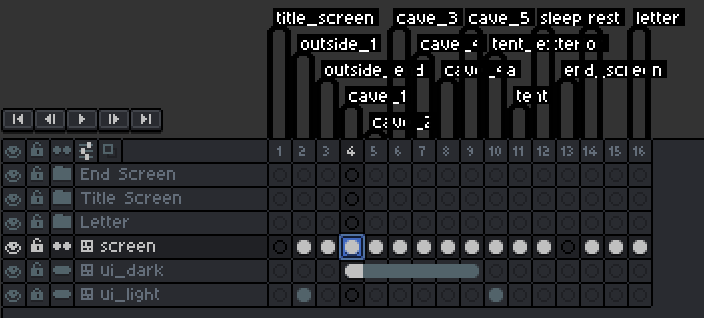
For the backgrounds, I ended up putting them all in one Aseprite file. I used the frame animation system to put each background on its own frame. This was convenient for a couple of reasons:
- It's simpler to navigate frames and layers than it is to navigate whole different files.
- Shared file means I can share the tilesets and making modifications to tiles makes it automatically update for all scenes. Very useful when I want trees to look the same across scenes.
- The static parts of the UI needs to be a part of the background too, so I put the UI on a different layer and I copy that frame to whatever backgrounds need it. Aseprite has a system where frames can be "linked" so that updating it on one frame means updating it on all its other linked frames, so updating the UI was easy. It's flexible enough that I could just not include the UI for a background, as is the case for various backgrounds for the game.
- Everything being in one file means that I have a very nice exporting workflow. Aseprite allows you to tag different groups of frames (primarily for distinguishing between different animations for the same sprite), but I used it to label the different backgrounds. I then made a script that would export each tag into its own file (taking the tag name as the filename). I could make a change and then run the script and update ALL of the backgrounds in one fell swoop. There ended up being 15 different backgrounds in the game, so it's REALLY nice to be able to make a change to a common element like the UI and not have to manually re-export all of them. If I didn't make a script and just exported each frame using Aseprite's normal options, then I would likely have to manually rename each file manually, gross.
Sprites
I wanted to make the character some sort of Creature, so I was inspired by the game Anode Heart's group of mouse miners so I made my own mouselike miner creature.
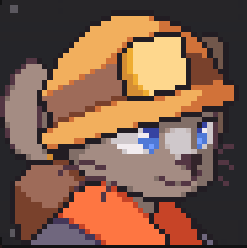
The Game Boy's sprite size limitations made it easier for me to just create a character sprite without obsessing over how it looks too much, because there was only so much that I could do in a 16x16 sprite. I could get it good enough and maybe do some tweaks, but I reached the final iteration of the ideas very fast. I based the character sprites on how Link looks in Link's Awakening, you can probably tell.
As for all of the static environment sprites: I just winged it and I got something that I liked. Making the trees was interesting because they are all meant to look the same, but the actual 8x8 tiles change depending on whether or not there are surrounding trees next to each other. The caves were pretty easy because I haphazardly made some walls and put them all together without really thinking about it.
I wanted to include some sort of "reason" why you were clearing out this tunnel, and I liked the idea of the tunnel being a popular road to a nice secluded flower field, so I put it in the game. I could have made reaching the flower field be a big deal in the game, but I like that you just stumble upon it. The letter that you read at the beginning of the game was written by "M", but I didn't really think about who "M" is other than that initial because I thought it would look nice in text as the initial.
Audio
Obviously with audio, you have to follow Game Boy sound hardware limitations.
4 Channels total:
- 2 Duty Cycle (variations of square waves)
- 1 Wave (you can draw the waveform that plays)
- 1 Noise (waves made of random noise)
If you don’t know what that means, it's kind of like having four independent instruments in a band, but each instrument can only play one note at a time. Each instrument has its own quirks and types of sounds that they can make and often have different functions within a song.
Music can use all 4 of these channels, but sound effects can only use the 2nd Duty Cycle (DC) and the noise channel.
Music
Making music in GB Studio is quite interesting. They have an built in editor that allows for both piano roll and tracker based editing.
The built in editor is... probably fine. I actually couldn't get it to work most of the time: the play button was always grayed out and never worked it so I could never actually hear the song. Luckily, they have support for HUGETracker, so I used that instead. I have some amount of experience using tracker-based interfaces and even making Game Boy-ish music through using Furnace, so it wasn't that big of a leap to use (though there were certain quality of life things that I missed).
At first, I wasn’t even planning to have music in the game at all. This was kind of a late addition in development. But I had some time to polish the game and wanted to be able to say that I made music for the game, I guess. I ended up porting (de-making, I suppose) a song that I had made in Fall 2022 because I thought that it would be a good fit for the game. Having a song already composed sped up development and made me confident that I could add music to the game without delaying its release. There is actually a second half to the song, but I figured that something with less musical movement would be less annoying to hear for the entire game (and it would be less work for me).
And so, there is music that plays when you are in the cave. I was thinking about getting another song to play when you’re outside, but I never ended up doing that.
Sound Effects
The sound effects were the first audio that I put into the game, and the process to make it was… unexpected. There are basically three routes in GB Studio: upload an audio file that fits within certain specifications and hope that GB Studio will play it without mangling it too hard, use a file in the .vgm file format which I didn't know that much about, or use a very old tool called FX-Hammer that is used to make sound effects specifically for the Game Boy. the FX-Hammer approach gives you more control because you can specifically control the Game Boy audio hardware to play the audio you want.
Just using an audio file didn't seem to get the results I wanted. There didn't really seem to be much documentation of how exactly I can make audio files that would work well, so I didn't know how to make it better. So, I ended up using FX-Hammer. There’s only one catch: FX-Hammer is made to run ON the Game Boy, so I had to use an emulator in order to use it. The way that it works is that the save file contains up to a certain amount of sound effects, and you give that to GB Studio and that’s how you give it the sound effects. I used this video guide to help me get my bearings for this process.
FX-Hammer is pretty neat. It’s a tracker-like interface, but each row can have a different duration, unlike other music trackers where each row is a certain duration of time based on tempo settings. I made 4 sound effects for the 4 different levels of charge you can have while hitting rocks and 1 sound effect for when you charge too much.
Making sound effects is quite challenging. Like, at least music has some sort of language with which to communicate with, but with sound effects, you end up making a bunch of mouth noises to yourself in an attempt to understand how to make that noise with a computer unless you already know how to synthesize those noises. It’s like people trying to convey to their mechanic the weird way that their car sounds without a direct audio recording.
Music + Sound Effects
Of course, the music and sound effects are all using the same hardware, so that “only 4 independent sounds at a time” limitation applies globally. That means that when you’re playing music and a sound effect pops up, some channels may need to stop playing music and start playing the sound effect.
At first, my sound effects had made use of the 2nd duty cycle channel as well as the noise channel, so when you hit rocks, the music’s 2nd duty channel sounds cut out in favor for the sound effects. It might have been fine if the sound effects were infrequent, but mining is the main thing you do in the game, so the music cuts out a lot.
To minimize the effects of this, I did two things:
- For the music, the main harmonic line (the musical phrase that you hear all the time in the song) was on the 2nd duty cycle channel because I anticipated putting the melody on the 1st duty cycle channel. Since the harmony plays all the time in a very constant pattern, it is very obvious and annoying when that cuts out. Instead, I put the harmony line on the 1st DC channel and the melody, which doesn’t play notes as frequently, on the 2nd DC channel.
- For the sound effects, I just minimized the use of the 2nd DC channel as much as I could so interruptions wouldn’t happen as much. The sound effects still use the noise channel which was the bulk of the sound, but the music’s noise channel cutting out frequently isn’t as noticeable, so I allowed it.
I could have done more things like shortening the length of the sound effects so that the music cutting out would happen for less time, but I didn’t feel that I needed to.
Development
This ended up being, like, the smoothest development process that I've had for any game that has taken longer than a week to make. I didn't want to repeat the mistakes of Medical Malpicross, so I went with a very small-scope idea. Using GB Studio meant that I didn't have to reinvent the wheel, and it forced me to keep ideas small.
Everything genuinely just kind of fit together and I didn't really grow exhausted with working on the game. This is in contrast with Medical Malpicross, which I do not want to look at ever again. This meant that I could actually motivate myself long enough to polish the game, and I ended up adding the music and fixed some weird bugs. I think my favorite detail is the way the UI changes lighting conditions depending on whether or not you're outside in the sun or inside the cave. I paced myself and I estimated that it would take about 3 months to create when accounting for available time, and I was surprisingly spot on.
In a weirdly self-referential way, during the development of the game, I embodied the message that I was trying to put into the game: of working sustainably and trying not to burn yourself out, while trusting that working at that pace will bring you to the finish line. I am always trying to gain a better understanding of how I work, so this was good to see.